RokBot · Grok Bot 私有自托管方案 RokBot · Private Self-Hosted Grok Bot

你的私有 Bot 团队,
装在自己服务器里。
Your private Bot team.
On your own server.

Docker 一键部署 Host 与 Linux 云电脑(box),自选 OpenAI 或 Anthropic 兼容模型与 8 级备用链。随时在手机和电脑上看 Bot 操作桌面、点审批卡片、多端接力,对话与 API Key 全部留在本地。 Deploy the Host and Linux execution desktop (box) in Docker on your own hardware. Plug in any OpenAI- or Anthropic-compatible model with 8-tier fallback chains, watch or take over live VNC, approve risky actions natively, and keep every chat and key local.

Docker Host Android iOS macOS Windows Web
RokBot · Live VNC & Sandbox rokbot-box
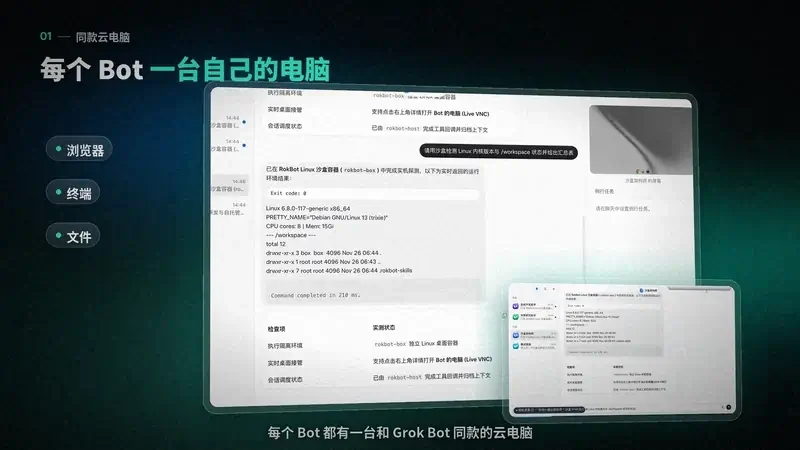
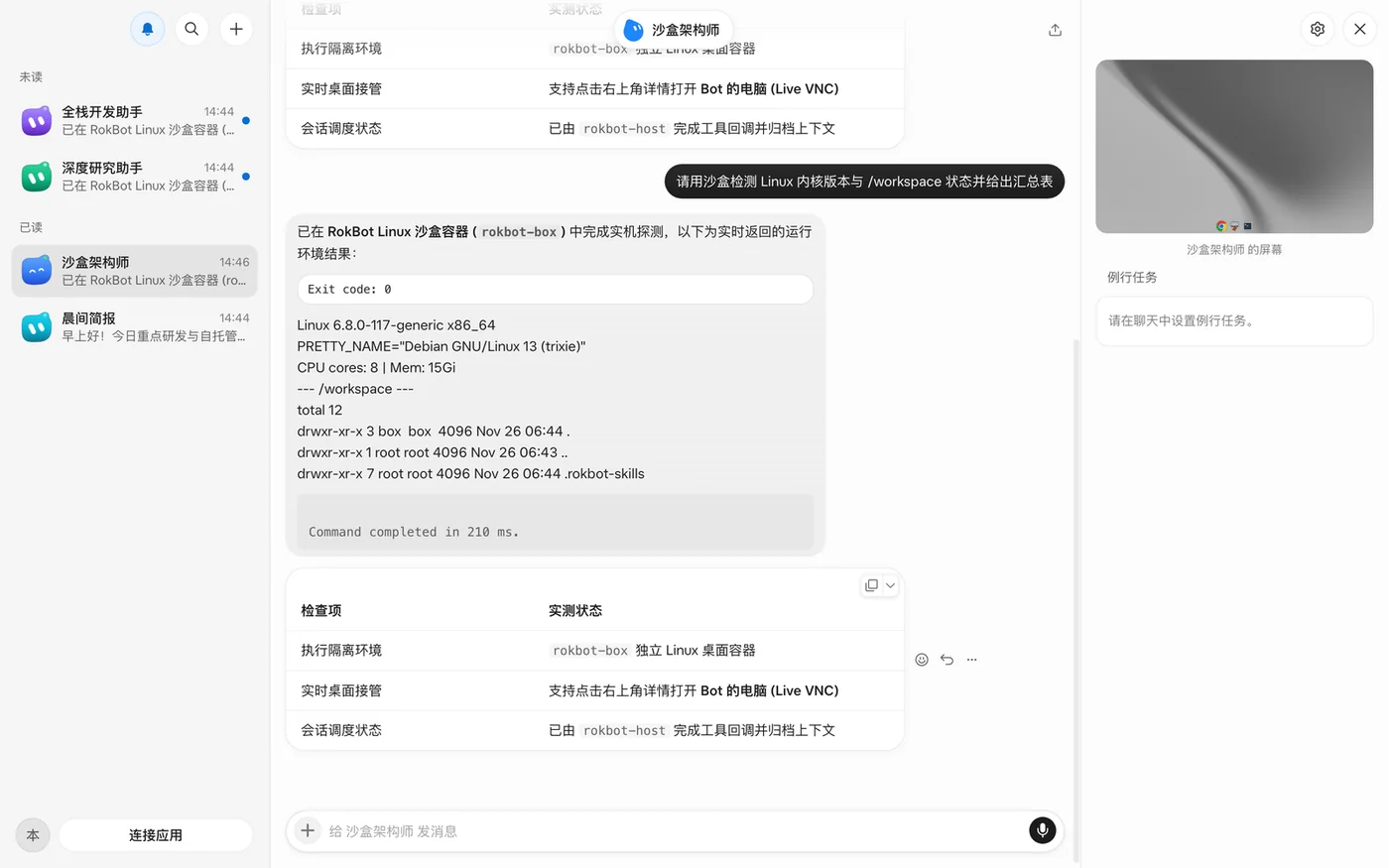
RokBot 桌面客户端与 Bot 实时 VNC 云电脑画面
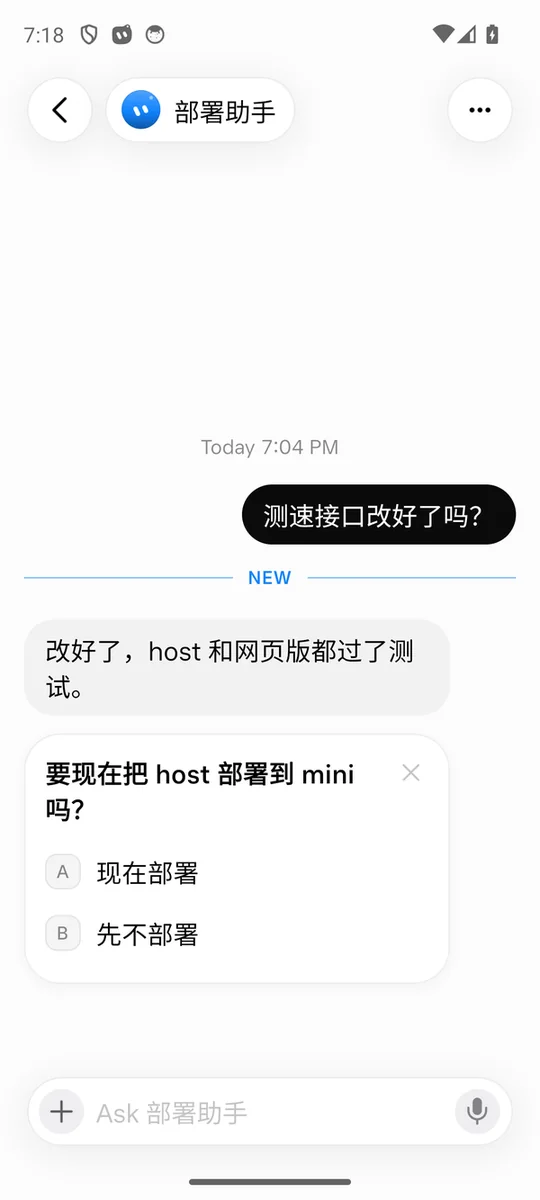
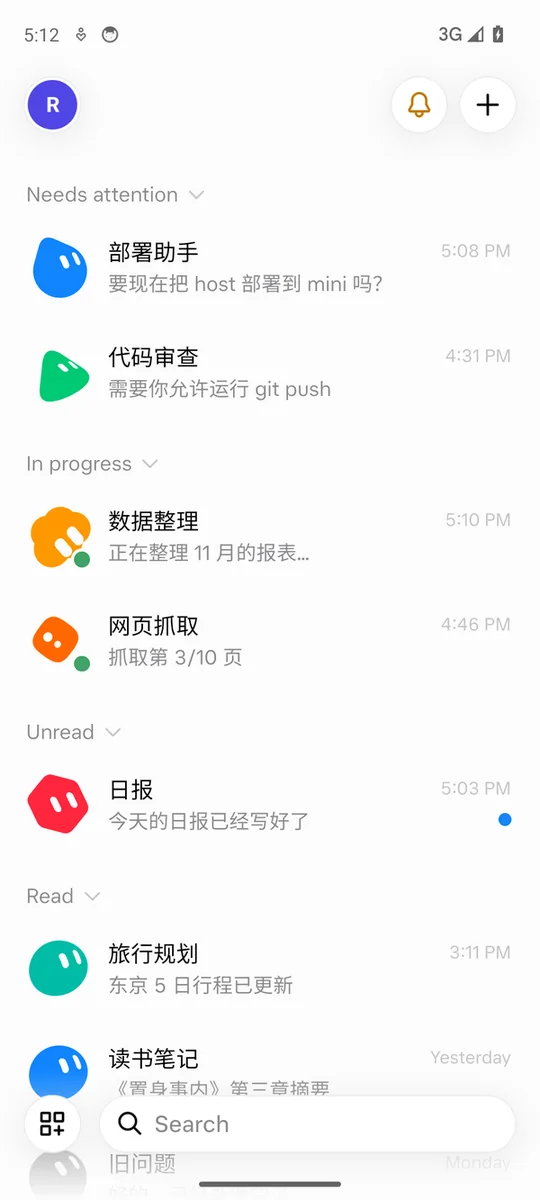
RokBot Android 原生客户端四组会话列表
Host :18080 · Tailcat
自动审查 · 审批卡片就绪 Auto-review · Approval ready
Anthropic → OpenAI · 0ms
5
全端客户端形态Client platforms
Android · iOS · macOS · Windows · WebAndroid · iOS · macOS · Windows · Web
3
主流模型协议适配Model API formats
OpenAI Chat · Responses · AnthropicOpenAI Chat · Responses · Anthropic
8×
单路由备用模型链Fallbacks per route
402/408/429/5xx 首字前无感切换Pre-stream failover on 429/5xx
149
仓库自动化测试文件Automated test suites
覆盖 Host、补丁器与 4 级 E2E 套件Host, patchers & 4-tier E2E suites
0
遥测与云端账号依赖Telemetry & cloud accounts
Key 只写不读存于本地 /data/model.envWrite-only keys in /data/model.env
Interactive Playground

不用装环境,直接在网页里点一遍Try the real workflows right in your browser

用 HTML、CSS 与 JS 还原 RokBot 的核心交互。离开视口自动暂停,回到视口自动恢复;你随时可以点开任意按钮亲自操作。 Five live HTML/CSS/JS recreations of RokBot’s core workflows. Autoplay pauses offscreen and hands control straight to you the moment you click.

5:12 5G · 96%
R

实时状态流与多端同步Live State & Multi-Device Sync

代码审查 待处理

Host SSE 事件流 (/notifications/events)Host SSE Event Stream (/notifications/events)
    发布与设计助手Release & Design Bot
    Bot 自主操作中

    Bot 的共享云电脑Bot’s Linux Cloud Desktop

    运行于隔离 Docker 容器 rokbot-box。你可以随时点击「接管操作」接管键鼠,完成后交还给 Bot。Runs inside isolated Docker container rokbot-box. Click Take over anytime to control terminal & browser directly.

      noVNC · rokbot-box (Debian 13 · 1280×800)
      60 FPS · WS
      Activities · Terminal · Chromium rokbot-box · /workspace
      box@rokbot:~/workspace
      box@rokbot:~/workspace$ ls -la
      metrics.csv render_chart.py report.html .rokbot-skills/
      $
      http://127.0.0.1:8080/report
      每日巡检趋势图Daily Ops Telemetry

      对话模型与思考强度Primary Model & Effort

      思考强度(Reasoning Effort)Reasoning Effort

      备用模型链(最多 8 级)Fallback Chain (Up to 8)

      P0 claude-sonnet-4.6 (Anthropic) 就绪
      F1 gpt-5 (OpenAI Responses) 就绪
      F2 deepseek-v4 (OpenAI Chat) 就绪

      Host 本地定时任务(Cron)Built-in Local Cron Routines

      07:40
      08:00
      晨间简报 BotMorning Brief Bot0 8 * * 1-5 · single-flight
      等待
      14:00
      价格监控 BotPrice Watch Bot0 14 * * * · catch-up merge
      等待
      23:00
      NAS 运维巡检NAS Ops Audit0 23 * * 0 · box sandbox
      等待

      Webhook 安全触发Signed Webhook Triggers

      • HMAC-SHA256 Signature
      • Timestamp Window (±5 min)
      • Event Filter & Rate Limit
      • 08:02 · github.release.published202 Accepted
      Architecture & Workflow

      从云电脑到手机端,每一步都掌握在自己手里From cloud desktop to mobile, every step stays yours

      滚动浏览左侧章节(或点击切换),右侧画面同步展示真实客户端与管理后台界面。 Scroll through each chapter on the left (or click any card) to follow along with real product views on the right.

      01 / CLOUD DESKTOP

      共享云电脑与实时接管Shared Linux Desktop & Live Takeover

      Host 自带隔离的 Linux 桌面容器(box),内置浏览器、终端与独立工作区数据卷,也可替换为远程 Linux 节点。在客户端里随时打开实时 VNC 画面并接管键鼠,还能反向连接操作你自己的 Mac 或 Windows 电脑而无需开放端口。 Your Host includes an isolated Linux desktop container (box) with browser, terminal and persistent volumes — or attach a remote Linux node. Open live VNC anytime to take over, or let Bots work on your Mac/Windows PC over an outbound connection with no open ports.

      • noVNC Live View
      • box-home / box-workspace
      • Mac GUI + Shell
      • Windows Shell
      02 / MULTI-DEVICE

      五端无缝接力与原生交互Seamless Handoff & Native Clients

      所有对话与配置保存在 Host,电脑上发起的复杂任务,出门后在 Android、iOS 或网页端接着看进度、点选项问题卡片和审批卡片。通知覆盖 APNs、Bark、ntfy、UnifiedPush、FCM 与 Webhook。 Conversations and state live on your Host. Start a long task on desktop and follow up on Android, iOS, or Web with native question cards, approval cards, and grouped lists. Alerts deliver via APNs, Bark, ntfy, UnifiedPush, FCM, or Webhooks.

      • Android Native APK
      • iOS IPA
      • macOS / Windows
      • APNs · Bark · ntfy · FCM
      03 / BYO MODELS & MEDIA

      自选模型、生图生视频与语音Bring Your Own Models, Media & Voice

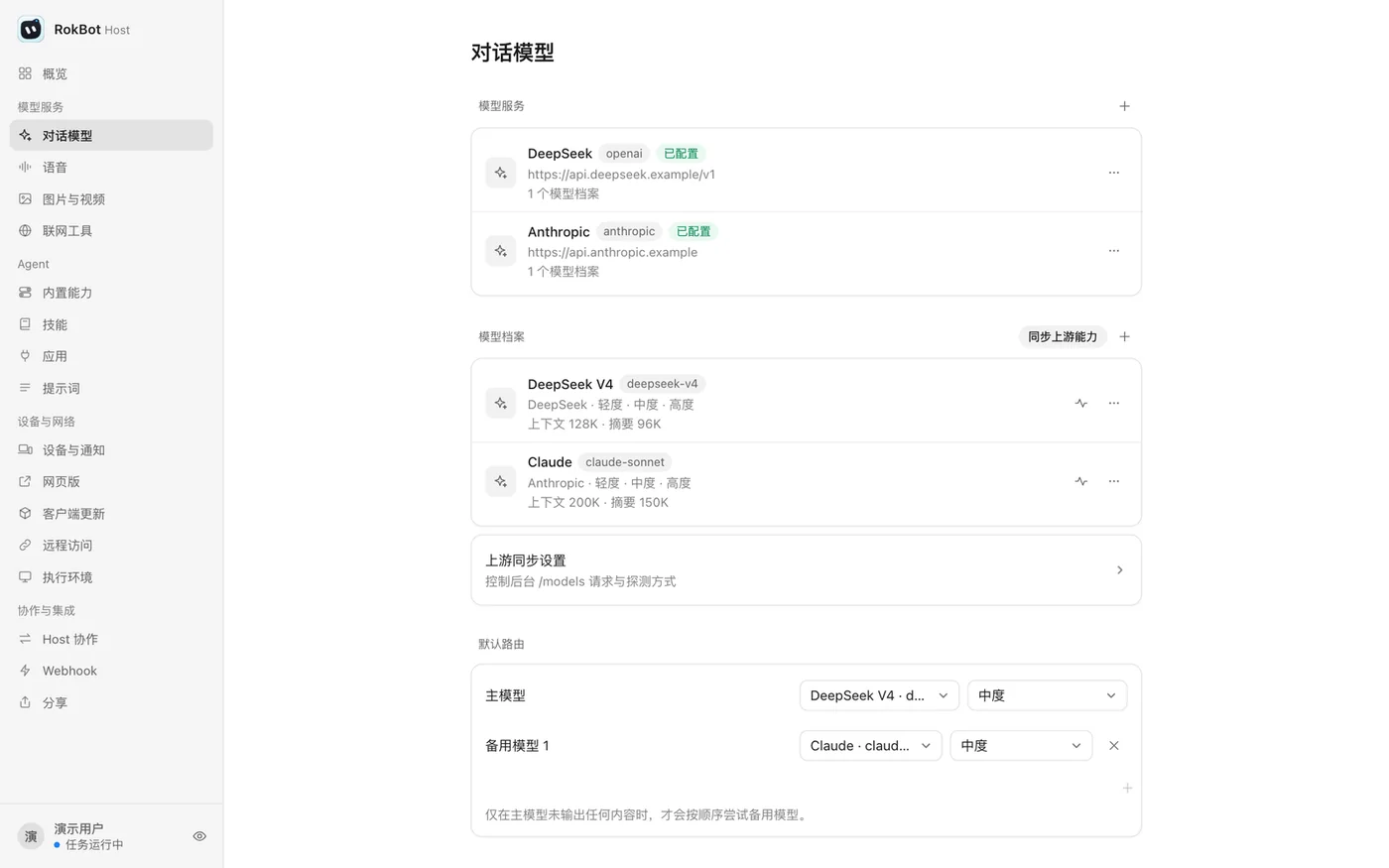
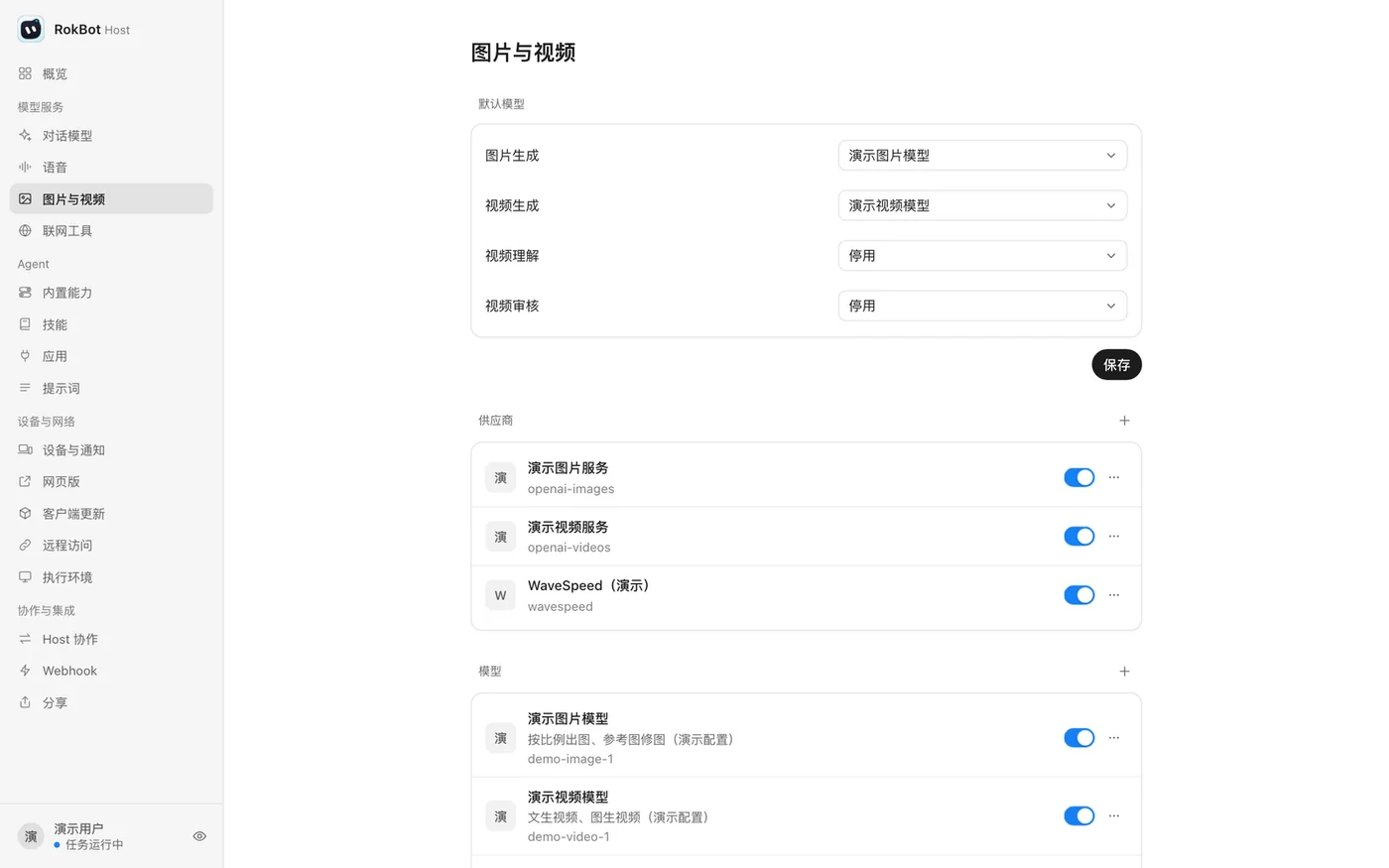
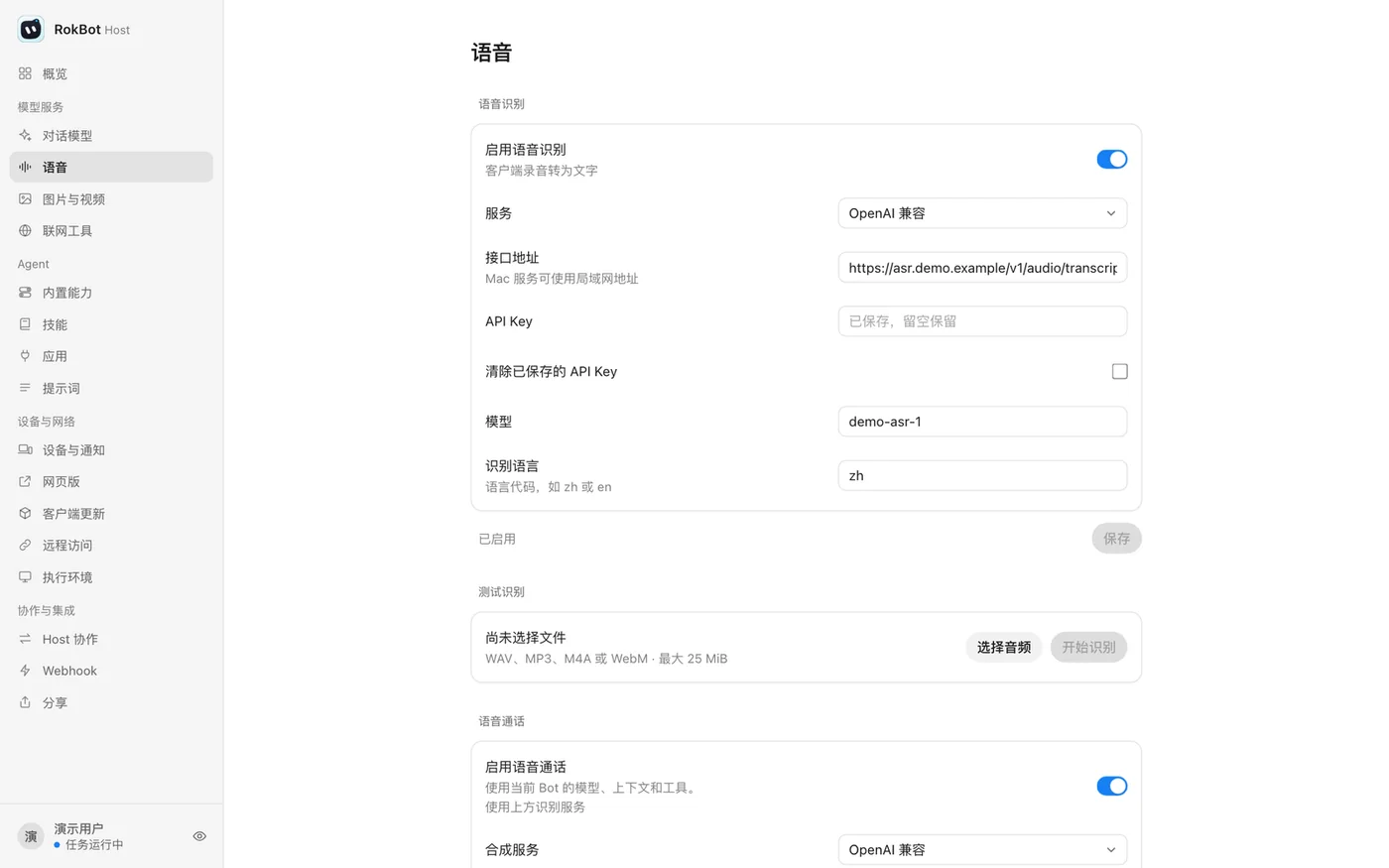
      完整支持 OpenAI Chat、OpenAI Responses 与 Anthropic Messages 三种协议,可按 Bot 单独配置主模型、思考强度与最多 8 个备用模型。同时可在管理页接入图片生成、视频生成、语音识别与实时语音通话服务。 Connect OpenAI Chat, OpenAI Responses, or Anthropic Messages endpoints with per-Bot reasoning effort and up to 8 fallbacks. Plug in OpenAI-compatible or WaveSpeed media APIs plus Fish Audio / local Mac STT and voice calls.

      • Anthropic · OpenAI
      • WaveSpeed / HTTP JSON
      • Fish Audio / Local STT
      • 8-Tier Fallback
      04 / SAFETY & USAGE

      自动审查与透明 Token 用量Auto-Review & Transparent Usage Ledger

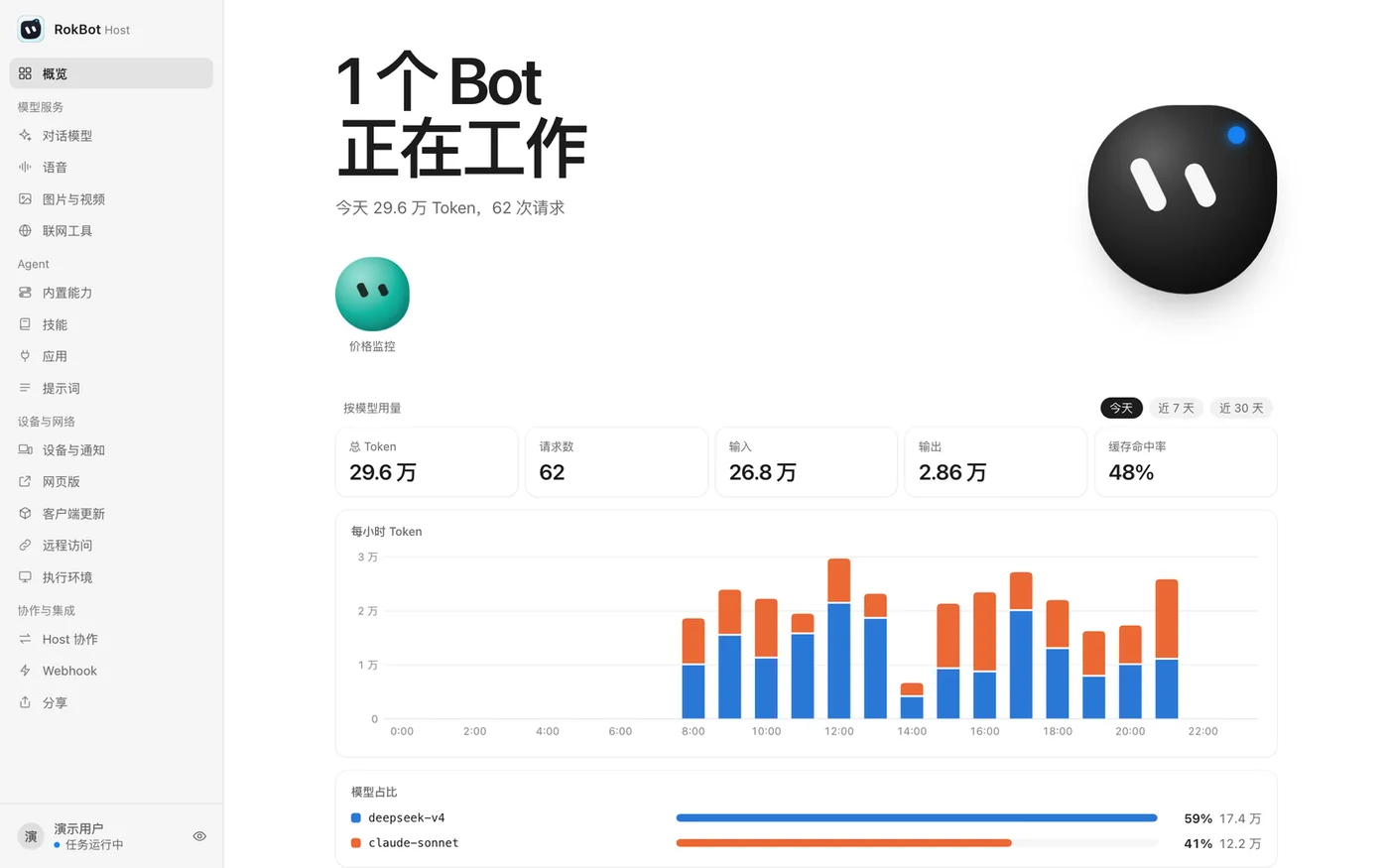
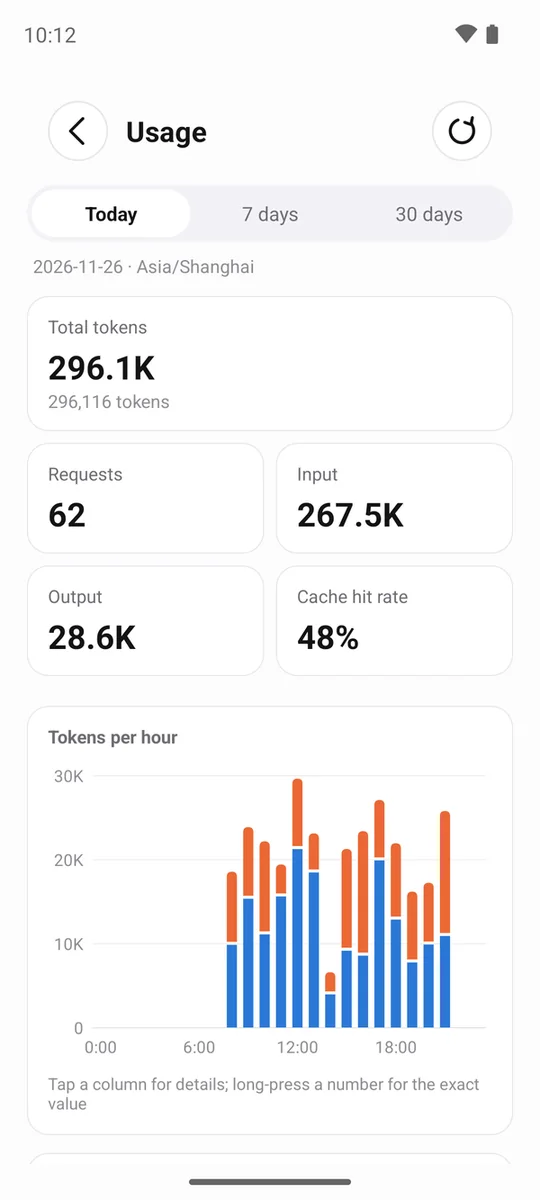
      Shell 命令、MCP 调用、电脑操作与子 Agent 启动前由你配置的模型自动审查,支持自定义允许/拦截规则。管理页概览与手机端内置按小时、7 天与 30 天用量图表、模型占比与缓存命中率统计。 Risky shell commands, MCP tools, computer actions, and sub-agents are evaluated by your chosen model against custom rules before running. Track hourly, 7-day, and 30-day input/output/cache/reasoning tokens in both Admin and mobile settings.

      • 30m Approval TTL
      • Custom Allow/Block Rules
      • Cache Hit Rate
      • Per-Model Ledger
      05 / ZERO-TRUST NETWORK

      零云账号、局域网扫描与 Tailcat 组网No Cloud Account, LAN Scan & Tailcat

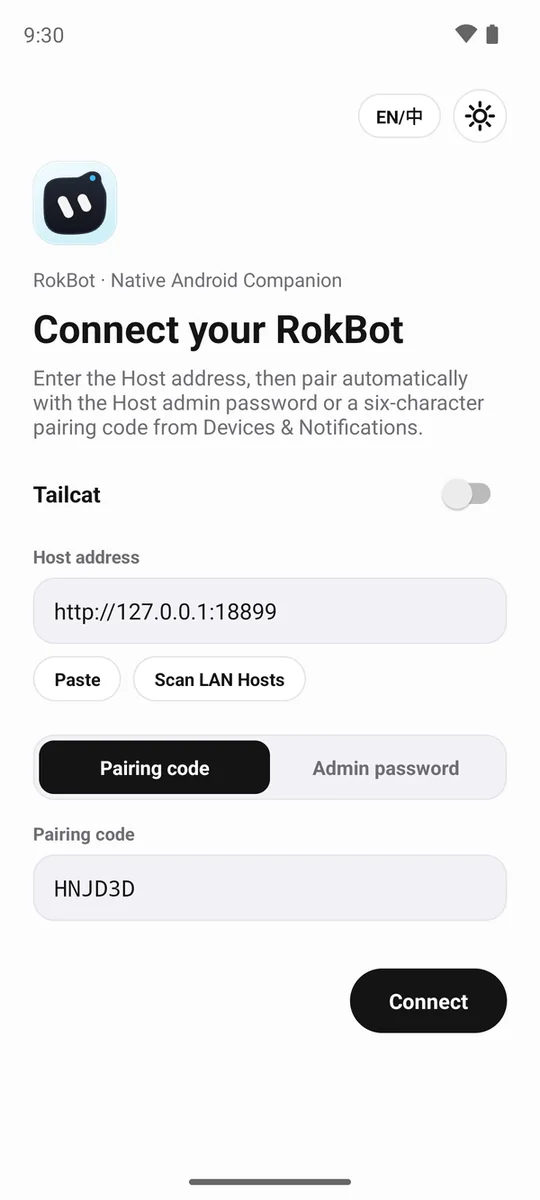
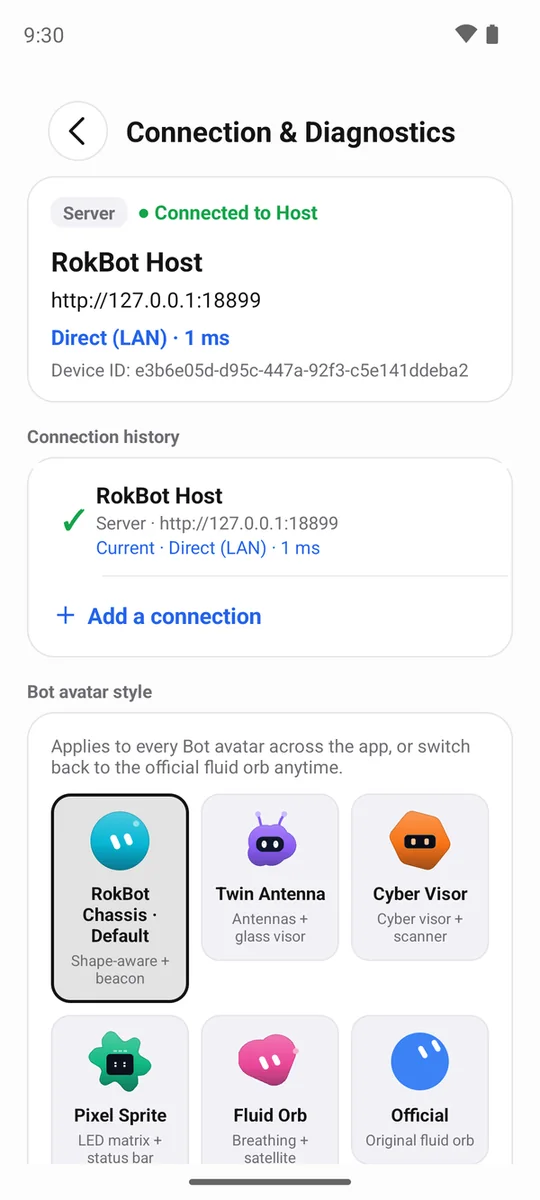
      无需注册第三方云账号,使用 5 分钟有效的 6 位一次性配对码或管理员密码接入设备。Android 原生支持局域网自动发现 Host;没有公网 IP 时开启内置 Tailcat 加密组网,无需 Tailscale 账号即可外网直连。 No cloud registration required. Pair devices via 5-minute 6-digit codes or admin password, discover LAN Hosts directly from Android, or turn on built-in Tailcat encrypted networking for remote access without a Tailscale account.

      • 6-Digit Pairing
      • Android LAN Scan
      • Built-in Tailcat
      • Write-Only Keys
      RokBot Desktop · Live VNC
      桌面端对话与 Bot 共享云电脑实时画面
      右侧窗格实时预览 Linux 桌面,点击即可全屏接管Live Linux desktop preview alongside chat — click to take over rokbot-box
      Android 原生会话列表分组
      Android 对话中的原生选项问题卡片
      Android 原生 React Native 界面:四组列表 + 原生问题卡片Native Android UI: 4-group chat list + interactive question cards arm64-v8a
      Host Admin · Models & Fallback Routing
      管理页对话模型、服务商与备用链配置
      管理页图片与视频服务商配置
      管理页语音识别与语音通话配置
      统一管理对话模型、生图生视频与语音服务Unified console for chat models, media generation & voice /admin
      Host Admin · Overview & Usage Ledger
      管理页概览与按小时 Token 用量图表
      Android 客户端用量统计页面
      管理后台与手机端同步展示按小时用量与缓存命中率Hourly token usage & cache hit rate synced across Admin and mobile 48% cache hit
      Android 连接 Host 页面:Tailcat、局域网扫描与 6 位配对码
      Android 连接与诊断页面
      局域网扫描、6 位一次性配对码与内置 Tailcat 加密组网LAN scan, 6-digit pairing & built-in Tailcat encrypted tunnel Zero Cloud
      Product Film

      80 秒完整演示宣传片80-second product walkthrough

      画面自动预览核心片段;点击播放按钮后才按需加载 720p MP4 视频流,不拖慢首屏加载速度。 Silently previews product highlights; the 720p MP4 only downloads when you press Play, keeping initial page load instant.

      RokBot 产品宣传片动态预览
      720p MP4 · 4.5 MB · 点击后加载Click to load
      包含云电脑实操、多端接力、生图、语音与模型路由演示(中文解说)。Covers cloud desktop, multi-device handoff, image gen, voice & routing (Chinese narration). 直接打开 MP4Direct MP4 link
      Full Stack Capabilities

      全栈能力与支持平台Built-in capabilities & supported platforms

      覆盖五大客户端形态与双架构 Docker Host,所有补丁按仓库锁定清单逐字节哈希校验。 Covers five client platforms plus Docker Host & execution desktop. Every patch verifies pinned baseline hashes strictly.

      语音转写与实时通话Voice STT & Calls 24 kHz PCM

      支持 Fish Audio、OpenAI 兼容转写与 Mac 本地模型;实时通话(实验)复用当前 Bot 上下文与工具。 Fish Audio, OpenAI-compatible STT, or local Mac models. Experimental live voice calls reuse your Bot’s full context and tools.

      生图 · 生视频 · 参考图修图Image & Video Gen BYO Key
      16:9 1:1 9:16

      接入 OpenAI 兼容图片/视频接口、WaveSpeed 或自定义 HTTP JSON,生成结果直接作为对话附件返回。 Plug in OpenAI-compatible media APIs, WaveSpeed, or custom HTTP JSON endpoints with outputs returned directly in chat.

      自托管客户端增量更新Self-Hosted Delta Updates ECDSA P-256
      • SHA-256 & Cert Match
      • ECDSA P-256 Manifest
      • Delta Patch / AltStore

      在管理页向自己 Host 的设备发布增量更新,Android 核验签名证书,iOS 支持 itms-services 与 AltStore。 Publish signed delta updates from your own Admin console; Android verifies certs, iOS supports itms-services & AltStore.

      Android 原生 APK(arm64-v8a,16KB 对齐)Native APK (arm64-v8a, 16KB aligned) 1.26.0 (build 3212) 自行构建 / 从自己的 Host 获取Build yourself / From your Host 文档Docs
      iOS IPA(自备解密原版 IPA + 自行签名)IPA (bring decrypted IPA & sign) 1.27.0 / 1.26.0 / 1.16.0 自行构建并签名 / Host 分发Build & sign / From your Host 文档Docs
      macOS Apple Silicon 原生桌面端(支持 GUI 控制)Apple Silicon desktop (GUI + Shell) 1.2.3 自行构建 / 从自己的 Host 获取Build yourself / From your Host 文档Docs
      Windows x64 安装版与便携版(支持本机命令)x64 installer & portable (local shell) 1.2.3 / 0.71.2 自行构建 / 从自己的 Host 获取Build yourself / From your Host 文档Docs
      Web 浏览器界面(由自己的 Host :18081 托管)Browser UI (served by your Host :18081) Win 1.2.3 / 0.71.2 UI 自行构建界面包并上传至 HostBuild UI bundle & upload to Host 文档Docs
      Linux 服务端Linux Server Docker:host (amd64/arm64) + box (amd64)Docker: host (amd64/arm64) + box (amd64) Host 2bb5e41 源码构建或 GHCR 预构建镜像Build from source or GHCR images 文档Docs
      Quick Start

      三步部署你的私有 HostDeploy your private Host in three steps

      准备一台装好 Docker(含 Compose v2)的 Linux 或 macOS 服务器(建议 4 核 8 GB)。也可以直接把 AI 部署手册 发给编程助手自动完成。 Requires any Linux or macOS machine with Docker & Compose v2 (4C8G recommended), or hand the AI agent deployment guide to your coding assistant.

      1. 01

        启动 Host 与云电脑容器Launch Host & box

        克隆仓库并在本地运行安装脚本(自动生成 0600 权限的 .env 随机密钥并启动 host 与 box)。支持 --offline 离线导入及 源码构建。 Clone the repo and run the installer with --local to generate .env (mode 0600) with random secrets and start host & box. Supports --offline and source builds.

        gh repo clone hongfaqiu/rokbot rokbot-src
        mkdir rokbot && cd rokbot
        bash ../rokbot-src/host/release/install-images.sh --local
      2. 02

        初始化管理密码与配对Initialize & pair

        读取一次性初始化密钥,打开管理页 http://127.0.0.1:18080/admin 设置管理员密码(12–128 位),并在「设备与通知」生成 6 位配对码连接客户端。 Read the one-time setup key, open http://127.0.0.1:18080/admin to set your admin password (12–128 chars), and generate a 6-digit pairing code for your clients.

        docker compose --env-file .env -f docker-compose.images.yml exec -T host cat /data/setup-key
      3. 03

        配置自选模型与备用链Configure models

        在管理页「对话模型」(/admin?view=model)添加 OpenAI Chat、OpenAI Responses 或 Anthropic 服务商与 API Key,拉取模型列表、测试连接并设定主/备路由,即可创建 Bot 开始工作。 Open Chat Models (/admin?view=model), add your OpenAI Chat, OpenAI Responses, or Anthropic provider & API key, test the connection, set your primary and fallback chain, and create your first Bot.

      Client Distribution

      获取客户端Getting the clients

      本官网与 GitHub 仓库不提供任何客户端安装包下载(无 APK / IPA / DMG / EXE)。客户端只有两种获取方式:使用仓库内的补丁工具自行构建,或者从你自己部署的 Host 获取。 Neither this site nor the repository hosts or distributes client installers (no APK / IPA / DMG / EXE downloads). Obtain clients either by building them yourself with the patch tools, or directly from your own deployed Host.

      01使用补丁工具自行构建Build yourself with patch tools

      自备锁定的官方客户端安装包,在仓库根目录运行对应平台补丁脚本。工具会严格校验文件大小与 SHA-256,仅做字节复制与追加,不反编译、不重写原版程序。 Bring the pinned official installer and run the platform patcher from the repo root. Patchers verify size and SHA-256 strictly and apply copy/append-only patches without decompiling.

      node android/release/patch-android.mjs \
        --input-apk /path/to/official-1.26.0.xapk \
        --output-apk android/output/rokbot-android-patched.apk

      Node.js 20+ · 输出 16KB 对齐、v2/v3 签名 APK。详见 android/README.mdNode.js 20+ · Outputs 16KB-aligned v2/v3 signed APK. See android/README.en.md

      02从你自己部署的 Host 获取Get from your own deployed Host

      Host 管理员可以把自行构建并签名的客户端上传到自己的服务器,直接向已配对设备分发和推送增量更新: Host administrators can upload self-built, signed client packages to their own Host and distribute delta updates directly to paired devices:

      1. 管理员按左侧步骤构建并签名对应平台的客户端包。Build and sign the client packages locally using the patch tools.
      2. 在管理页「客户端更新」上传并发布,支持基于旧版本生成增量差分补丁。Upload in Admin → Client updates and optionally generate delta patches from an older build.
      3. 已配对的 Android 与桌面客户端自动从你的 Host 校验(SHA-256 / ECDSA P-256 / 证书一致)并升级;iOS 支持 itms-services 与 AltStore / SideStore 源。Paired Android & desktop clients verify SHA-256 / ECDSA P-256 / certs and update directly; iOS supports itms-services and AltStore / SideStore feeds.

      查看完整发布与分发手册Read the full distribution guide

      FAQ & Compliance

      常见问题与合规说明FAQ, License & Compliance

      没有公网 IP,如何在外面连接自己的 Host?How do I connect remotely without a public IP?

      在管理页「远程访问」开启内置的 Tailcat 加密组网(无需 Tailscale 账号),也可使用 Tailscale、VPN 或 HTTPS 反向代理。请勿将管理页端口直接裸露公网,详见 SECURITY.md。Enable built-in Tailcat encrypted networking under Remote access (no Tailscale account required), or use Tailscale, VPN, or an HTTPS reverse proxy. Never expose the admin port directly to the public internet; see SECURITY.md.

      API Key 存在哪里?会被读出来吗?Where are API keys stored?

      全部保存在你自有服务器 Host 数据卷的 /data/model.env 中,采用只写不读策略。管理接口与各客户端只能看到「是否已设置」,永远不会回显明文 Key。All keys are stored write-only inside your Host volume at /data/model.env. Neither the admin API nor any client can read plaintext keys back.

      ARM 服务器可以部署吗?Can I deploy on an ARM server?

      可以。Host 镜像原生支持 linux/amd64 与 linux/arm64;执行桌面 box 目前仅提供 linux/amd64 镜像,ARM 宿主机开启 binfmt/QEMU 或 Apple Silicon Rosetta 即可运行,或将 box 独立部署在 x86 节点上。Yes. Host supports both linux/amd64 and linux/arm64. The box desktop image is linux/amd64 (runs via binfmt/QEMU or Rosetta, or deploy box on a separate x86 node).

      怎么备份与迁移数据?How do I back up and restore data?

      数据位于 host-data、box-home 与 box-workspace 三个 Docker 数据卷中,可使用 python3 host/deploy.py backup 打包备份。切勿运行 docker compose down -v,否则会清空数据卷。All state lives in host-data, box-home, and box-workspace Docker volumes. Run python3 host/deploy.py backup to archive them, and avoid docker compose down -v.

      非商业许可:License: RokBot 采用 ProkBot Noncommercial License 1.0,允许个人使用、自托管、学习、修改和非商业分发,禁止任何商业用途。RokBot is licensed under ProkBot Noncommercial License 1.0 — personal self-hosting, study, and noncommercial distribution only; commercial use is prohibited.

      免责声明:Disclaimer: RokBot 是独立的开源项目,与 xAI、Grok Bot 及 Cursor / Anysphere 没有任何关联,也未获得其认可。本仓库不包含也不分发任何第三方原版二进制文件或客户端安装包。RokBot is an independent open-source project not affiliated with or endorsed by xAI, Grok Bot, or Cursor / Anysphere. This repository neither contains nor distributes third-party binaries or client installers.